
Broken Links in Your Coaching Funnel: How to Never Send a Lead to a Dead Page
Nothing's worse than your Instagram bio going to a page not found. A lead was interested enough to tap. Your coaching funnel had one job at that moment, and the link sent her nowhere.
I have helped so many coaches over the years, and I can tell you dead links are real. The fix is one file in your coach brain called Links.md. Every link you send people to lives there, checked and dated. Every button Claude builds pulls its link from that file, so no button ever goes to a dead page.
Why broken links show up in a coaching funnel
A coaching funnel has a lot of links in it. You've got opt-in pages and a booking page. You've got a paid offer, a challenge, your socials and your terms and conditions. Then every email, post and thank-you page points back at those.
Each of those links gets typed or pasted somewhere. Then a page moves, a calendar changes or an offer gets renamed. The old link is still sitting in a button on a page you built months ago.
The same link can live in a lot of places. When it changes, you fix the ones you remember and miss the rest.
What a dead link costs you
A broken link shows up at the worst possible moment. Somebody saw your reel, liked what you said and tapped the link in your bio. Or she opened your email and clicked the button to book.
That person raised her hand. When she lands on "page not found," you lose the lead you worked to get. Very few leads will stop to email you that a link is broken, so she leaves.
And you usually don't find out until somebody tells you or you stumble on it yourself. By then you've got no idea how many people hit that page before you did.
How a Links.md file fixes broken links for good
Links.md is file eight of the 10 files in my coach brain. A coach brain is a folder of files Claude reads before it writes a single word for your business. The first six files are about you and your brand. The last four are about how your business runs, and Links.md is one of those four.
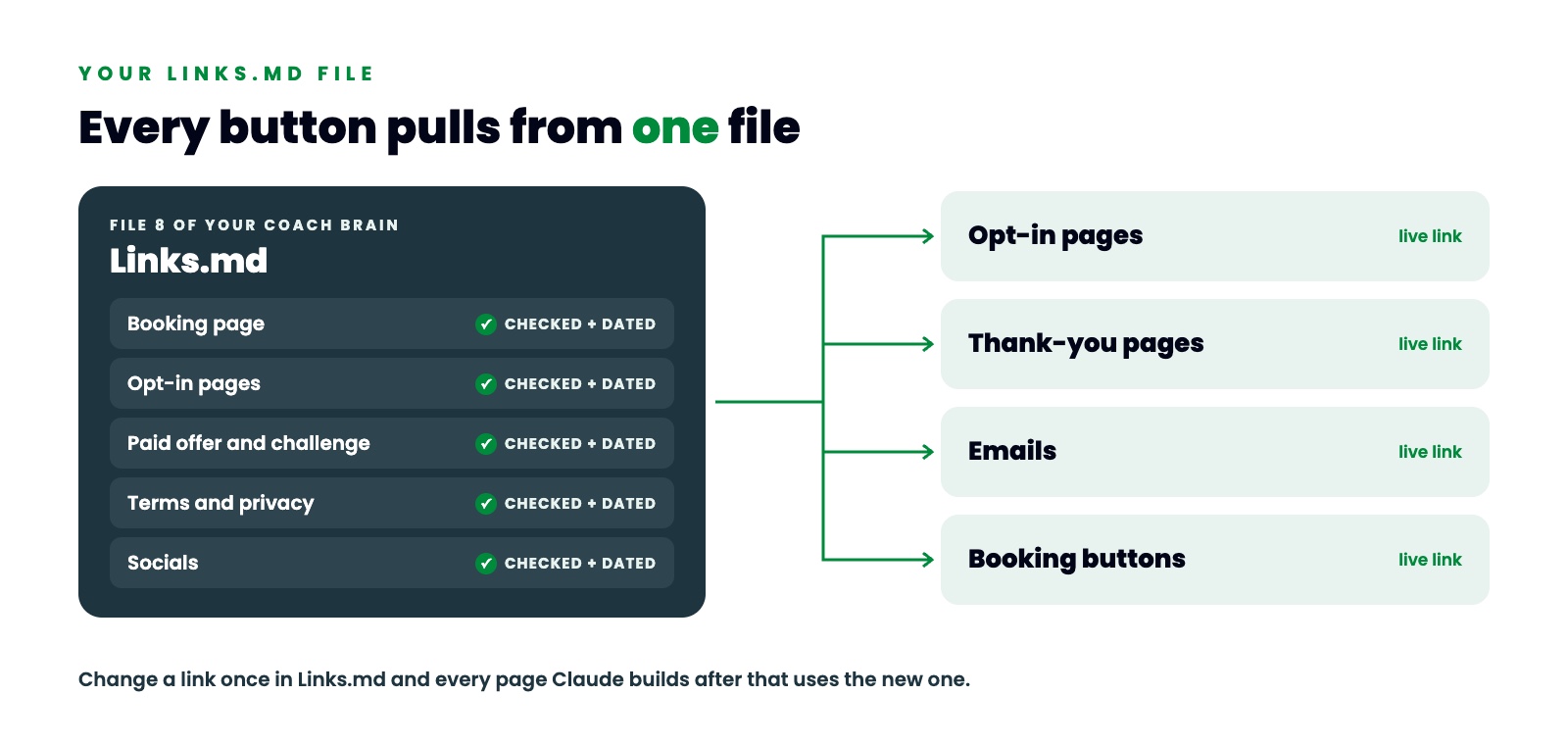
This file holds all the links you send people to. Every opt-in page lives here. So do your booking pages, your terms and conditions, your paid offer, your challenge and your socials. If a link could show up anywhere in any of your funnels, it lives in your Links.md file.
When Claude builds a button, it opens Links.md and pulls the link from there. That's why no button ever goes to a dead page.
What goes in your Links.md file
Mine is set up as a simple table. Each row is one link, and each row answers four things.
The first is the name, like "Book a demo." The second is what it's for, like "every demo CTA." The third is the link itself. The fourth is its status and the date I last checked it.
The date tells Claude how fresh each link is. My file has a rule at the top that tells Claude to recheck any link older than 30 days before it uses it. Another rule says never make up a link. If it isn't in the table, it doesn't go on a button.
I group my links so they're easy to scan. Offers and the main site go in one group. Live lead magnet opt-ins and their thank-you pages go in another. Legal pages like my privacy policy and terms get their own group, and so do my socials.
One giveaway can take up three rows. The Coach Brain Builder has its opt-in page, its thank-you page and the page that delivers it in the welcome email. That's three links that all have to work for one lead to get what she asked for. If any one of them breaks, she's stuck halfway through your funnel.
Side note, never put a password or a login in any of these files.
Change a link once and every page follows
Links.md pays off the day a link changes.
Say your booking link changes. Without a Links.md file, you'd go hunting through every page, email and post to find the old one. With it, you change the link one time in Links.md. Every page Claude builds after that uses the new link.
You no longer have to carry your links around in your head or wonder which version of your booking link is the right one. The right link sits in one file.
The files that work alongside Links.md
Links.md doesn't work alone. Three other files in part two of your coach brain keep your funnel pages right.
Business.md holds the facts every page needs. That's your legal business name, the domain your funnels live on, your privacy page, your disclaimers and your terms. If your website already lives on Thrive Engine, your funnels can live right on your own domain, like yoursite.com/free-plan.
Systems.md is how your business runs inside your CRM. That covers whether texting is turned on, which calendar people book on and what hours your automations are allowed to send.
Lead Magnets.md is a running log of every lead magnet you've built, with its funnel, its tag and its follow-up name. So Claude never builds the same thing twice inside your CRM, and it always knows what's already working.
Put those together and Claude knows your facts, your links, your systems and your giveaways before it builds a single page.
How to set up your Links.md file this week
Start by making a list of every link you send people to. Open your Instagram bio, your last few emails and every funnel page you have live. Write down each link you find.
Then click every one of them and mark which ones work. Put today's date next to each one. Fix the dead ones first, starting with your Instagram bio link and your booking page.
Put the list in one file called Links.md inside a folder called Coach Brain. Mine lives on my desktop, and I open Claude in that folder every time I work on my business. That way Claude reads the file before it writes a button.
From then on, when a link changes, change it in that file first. Let Claude pull from it every time.
You don't have to build all 10 files by hand. With the Coach Brain Builder, Claude interviews you one question at a time and writes all 10 files. It takes about 45 minutes.
Your coaching funnel is only as good as its links
Years ago I shipped a coaching program on DVD to people in 26 countries. Later I built a software company to $60,000 a month in recurring revenue. Today more than 140 coaches run their business on Thrive Engine. Every automated system they run, from their daily content to their lead follow-up, runs from their coach brain.
All of those systems have buttons, and every button needs a live page behind it. Put your links in one file and keep them checked and dated. Then your coaching funnel never sends another lead to a dead page.
The full video is on my YouTube channel, Brian Devlin. Watch it here: https://www.youtube.com/@briandevlinmedia
FREE COACH BRAIN BUILDER
Get the free Coach Brain Builder
The Coach Brain Builder gives you the prompts that build your 10-file coach brain in about 45 minutes.
Comment COACH BRAIN on any of my posts, or DM COACH BRAIN to @mythriveengine on Instagram, and I'll send it to you. You can also grab it here: https://sites.mythriveengine.com/coach-brain
Want to see the funnels and systems that run off your coach brain inside Thrive Engine? Book a Thrive Engine demo.
