Instagram DM Automation for Coaches: Turn One Word Into a Lead
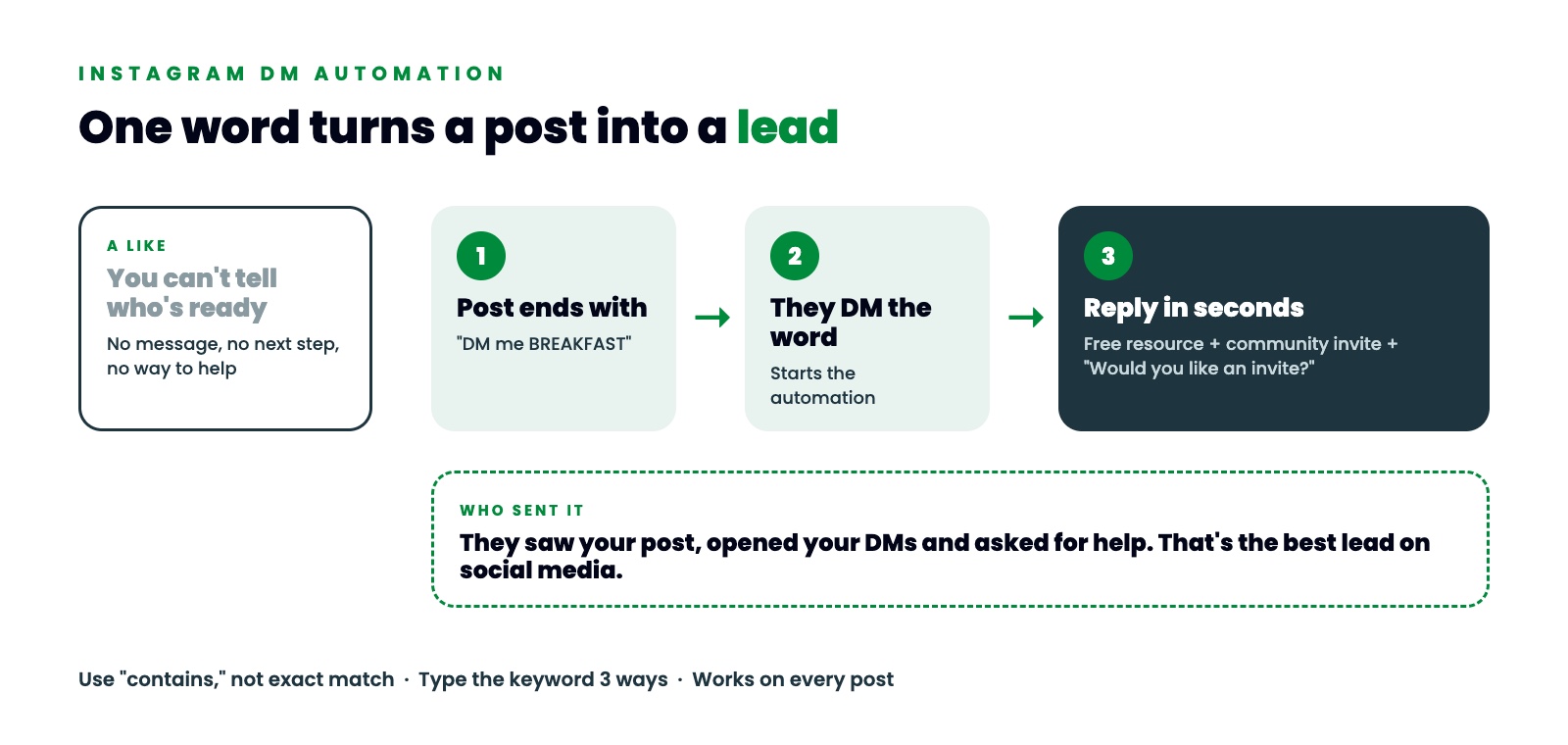
A like is nice. A DM with a keyword is a lead. Instagram DM automation lets you turn that keyword into a reply, a free resource and an invite to your community, all in a few seconds.
This post shows you how to pick the word, where to put it and how to set up the automatic reply so you never miss someone who asked for help.
Why a like doesn't tell you who's ready
Likes feel good. They also tell you almost nothing.
Someone might like your post because the photo was nice, because they know you or because they were scrolling fast. You can't tell which of those people need help with their health, their training or their energy right now.
So a lot of coaches guess. They send cold messages to people who liked a post. Or they wait and hope the right person reaches out. Both take time away from the clients you already have, and neither one tells you who is ready.
What makes a keyword DM different
Think about who sends you a message with a keyword in it.
They saw your post. They opened your DMs. They typed the word you asked for. Three small steps, and every one of them was their choice.
That's someone asking for help. On social media, it's the best lead you can get.
A keyword DM also tells you what they want. If someone sends BREAKFAST, you know they read the post about quick breakfasts. You know which problem they care about before you say a word.
How to pick your keyword
Your keyword is the word people type to get your free resource. Pick it with a few simple rules:
- One keyword for each free resource. BREAKFAST gets the breakfast guide. RESET gets the sugar reset. Then you always know what someone asked for.
- Easy to spell. Short, common words work best. People type fast on a phone.
- Tied to the result. The word should remind them of what they get.
- Used in every related post. Put the same keyword at the end of every post about that topic, not only the first one.
The line at the end of your post can be as simple as "DM me BREAKFAST and I'll send you my 5-day plan."
Why we use a DM keyword instead of a comment keyword
You've probably seen "comment the word below" posts too. They can work, and a comment shows up on your post where other people see it.
Comment triggers in GoHighLevel have one limit. A comment automation needs you to choose each post it watches. Every new post means another trip into your settings, and if you forget one, those comments get no reply.
A DM keyword doesn't have that problem. The automation listens to your DMs, so it works on every post, reel and story that mentions the word. You set it up once and keep posting.
Keyword ideas by type of coach
Your keyword should point straight at the free resource. A few examples to get you started:
Health and nutrition coaches
- BREAKFAST for a quick breakfast guide.
- RESET for a short sugar reset.
- GROCERY for a one-week grocery list.
Fitness coaches and trainers
- BACK for a morning routine that loosens a stiff lower back.
- HOME for a no-equipment home workout.
- KNEES for a warm-up before squats.
Wellness coaches
- SLEEP for an evening wind-down routine.
- CALM for a short stress reset.
Write the word in capitals in your post so it stands out, like "DM me RESET." Avoid words people use in normal conversation, like "hi" or "help," or your automation will fire on messages that weren't meant for it.
How to set up Instagram DM automation
I build this in Thrive Engine, which runs on GoHighLevel. The same steps work in any GoHighLevel account.
- Create a workflow and set the trigger to "Customer Replied." This fires when someone sends you a message.
- Filter the reply channel to Instagram DM. You can also set it up for Facebook.
- Set the message body to "contains" your keyword. Don't use an exact match. People add other words, like "BREAKFAST please," and "contains" still catches them.
- Type the keyword three ways. All caps, lowercase and capitalized, so it works whichever way someone types it.
- Add the reply. Send an Instagram message as a reply to their DM with the link to your free resource.
- Add the invite. In the same message, invite them to your free community and ask, "Would you like an invite?"
- Save and publish.
That's the core of Instagram auto DM. From here, anyone who sends your keyword gets the resource in seconds, any time of day.
What to say in the reply
The reply matters as much as the keyword. Put everything in the first message, because the person is paying attention right now.
Something like this works: "Hey, thanks for DMing me. Here's the link to download your 5-day breakfast plan. While I have you, I have a free community for women over 40. I give away free resources like this one, and I go live once a week so you can ask me questions. Would you like an invite?"
Then give them two buttons, "Yes, invite me" and "No thanks."
- If they say yes, ask for their best email and send the invite.
- If they say no, reply, "No worries. If you change your mind, I'm here. You can DM me anytime."
Either way, they got what they asked for and nobody felt pushed.
Why speed matters here
DM automation works because people message you when they feel the problem. If you answer the next morning, they've moved on.
You can't sit on your phone all day. You're coaching, cooking dinner or asleep. An automatic reply answers in seconds every time, even when you're with clients. That's the whole point of setting it up.
Common mistakes to avoid
- Using exact match. One extra word and the automation won't fire.
- Only one spelling of the keyword. Add all three versions.
- A reply with no next step. Always include the community invite and the question.
- Changing the keyword between posts. Keep one word per resource so your posts and your automation stay in sync.
- Forgetting to publish. A saved workflow that isn't published doesn't run.
FREE AI AVATAR BLUEPRINT
See it work on you
The fastest way to understand DM automation is to be on the other end of it.
Open Instagram and DM the word AVATAR to @mythriveengine. You'll get my free AI Avatar Blueprint in seconds. It helps you get clear on who you're talking to and what they care about, so you can pick keywords and free resources they'll actually ask for. And you'll watch the exact automation from this post answer you.
If you'd rather have it set up for you, book a Thrive Engine demo. We'll walk you through it and see if it's a good fit.
