YouTube Marketing Strategy for Coaches: Get Clients With One Video a Week
My whole YouTube marketing strategy is one video a week. I film for about an hour. That one long video turns into a short video every day, plus carousels, posts and blog posts. Every piece ends with one word that gets somebody to comment or send me a DM.
This post walks you through the seven steps I use, so you can see how to get coaching clients from YouTube without living on social media. I call it the One-Hour Waterfall. I'm building it in public and I'm only two weeks in.
Why I built my YouTube marketing strategy around one video
I built my software to $60,000 a month in revenue without ever posting on social media. It came from my email list and a handful of affiliates.
Then one affiliate relationship went bad and it hurt our business. I learned that I didn't control how people found me. When you borrow someone else's authority, you also hand them your whole customer base.
My email list is the reason it didn't hurt worse. So I decided to build my own audience out in the open, where no one can pull the plug. The One-Hour Waterfall came out of that decision, and now I teach it to our Thrive Engine members.
How one video becomes a full week
A waterfall starts with one stream at the top. For me, that stream is an hour of filming.
The hour gives me one long video. Then it spills down into a short video every day, a post, a carousel and a blog post, with a LinkedIn post on the weekdays. By Friday I've shown up on YouTube, Instagram, Facebook, TikTok, Pinterest, LinkedIn and my blog.
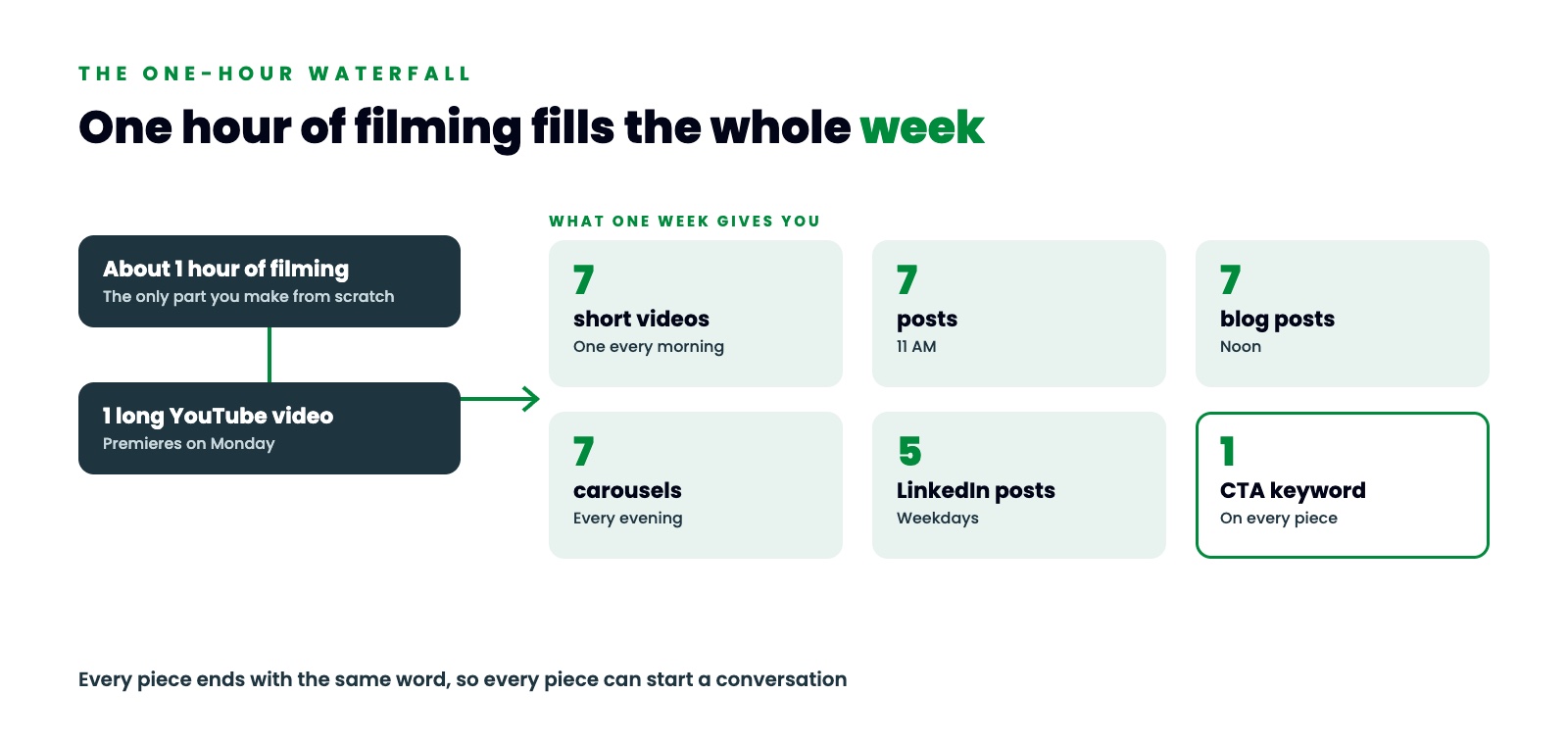
Each level goes a little deeper than the one above it, so nothing is a copy of anything else.
To make the steps easy to follow, I use one example coach. She's made up. She's a health coach who helps women over 40 lose weight and keep their muscle while they're on a GLP-1. She posts every day and people like her posts, but almost nobody books a call.
Step 1: Pick a topic your clients already search for
Your next video should be about something your clients already type into YouTube.
When I looked up GLP-1 weight loss for our example coach, it had about 31,800 searches a month on YouTube. Ozempic had about 243,000. Nobody has to be convinced to care about a topic they're already typing in.
I look this up in vidIQ before I plan anything. It takes about five minutes.
Then ask one more question. Does this topic lead to what I sell? Our coach runs a program for women over 40, so GLP-1 weight loss walks people right up to her offer. If a topic gets views but never leads to your offer, skip it.
Step 2: Write the title and the thumbnail
The search phrase goes at the front of the title, with the result right after it. For our coach that's "GLP-1 Weight Loss After 40: How to Keep Your Muscle."
I paste every title into vidIQ's scorer before I use it. It gives me a score out of 100. The title of this week's video scored 96.
The thumbnail is her face and two to four words. For our coach, the words are "Keep Your Muscle." The title tells people what the video is, and the thumbnail tells them what they get out of it. So the two should say different things.
Step 3: Plan seven clips before you film
I see coaches do this backward all the time. They film a 12 minute video and then go hunting for clips. What they find are lines like "as I mentioned earlier," which make no sense alone.
So before I hit record, I write seven clip moments into my script. That's one for every day of the week. Every clip has the same four parts:
- A first line that makes sense with no context.
- One point.
- One proof, like a story or a number.
- One line that leads to your keyword.
Our coach's Thursday clip opens with "If you just started a GLP-1, do this at your next meal. Eat the protein first." You could drop that in front of a stranger and it would make sense.
Step 4: Pick one giveaway and one word
Every video should give away one thing, and it should take one word to get it.
The best giveaways promise a specific result in a specific amount of time, without the thing your client already hates. Compare a free ebook called Healthy Eating Tips with a one-page plan called The 5-Day Muscle-Saver Plan. The second one tells a woman on a GLP-1 that she can lose the weight, keep her strength and never count a calorie.
Then pick one word to ask for it. Choose something nobody types in a normal message. For our coach it's LEANPLATE. A word like "protein" would set off the automation every time someone mentioned protein in a regular conversation.
When someone comments or DMs the word, the reply goes out in about two seconds. It sends the giveaway and asks if they want to join the email newsletter. If they tap yes, it asks for their best email. That reply runs inside Thrive Engine, which runs on GoHighLevel.
Step 5: Set up YouTube so every short leads to the long video
To get monetized on YouTube, you need 4,000 watch hours. Those hours come from your long videos. So every short has to send people to the long one.
In YouTube Studio, open the short and scroll to the field called Related video. Pick your long video. Now there's a link under the short that goes straight to the full video. Then add the short to the same playlist as the long video and save. It takes about 30 seconds per short.
Two more settings matter. Put your search phrase in the first sentence of your description. Then pin a comment on your long video that tells people how to get the giveaway. Our coach's pinned comment says, "Want the 5-Day Muscle-Saver Plan? Comment LEANPLATE or DM it to me on Instagram and I'll send it over."
Step 6: Teach the AI who you are
If AI content sounds generic to you, the AI doesn't know you. You typed a one line prompt, so it gave you the average of the whole internet.
I keep a handful of short documents. One covers how I talk, with a list of words I'd never say. Another covers who I help and the exact words they use about their problem. The rest cover what I sell, my full story and how my stuff should look.
You set them up once and the AI uses them every week. When it writes a post, it starts from my voice. When it builds a carousel, it uses my colors.
Step 7: Put the whole week on one calendar
The last piece is my weekly map. It's a one-page plan with the topic, the seven clips and what goes out on which day.
On Monday the long video premieres. Each morning one short video goes out to all my platforms. At 11 there's a post, and at noon there's a blog post. In the evening there's a carousel, and every weekday there's a LinkedIn post.
You film one video, and that's the only part you make from scratch. An AI system cuts the clips and writes the first draft of the posts, the blog and the carousel from what you said in the video. You read each piece and say yes or fix it. Then Thrive Engine posts it on its day and time.
After that, your job is to answer the people who comment your word.
Why this YouTube content strategy stacks up
One week gives you one long video, seven short videos, seven carousels, seven posts, seven blog posts and five LinkedIn posts.
Do that for 12 weeks and you have 12 long videos and 84 of everything else. All of it points at the same next step. The older pieces keep working while you film the new ones.
Week one brings in a few people. Week two brings in a few more, plus whatever week one is still bringing in. That stacking is the reason I film every single week.
I build this full week for our example coach in the full video. Watch How to Get Coaching Clients From YouTube With One Video a Week.
FREE WATERFALL PLANNER
Get the free Waterfall Planner
The Waterfall Planner puts this whole YouTube marketing strategy on one page, so you can plan a full week of content from one video. It includes the AI prompt that writes your video scripts with you.
Comment WATERFALL on any of my posts, or DM the word WATERFALL to @mythriveengine on Instagram, and I will send it to you.
Want help building your own One-Hour Waterfall? Book a Thrive Engine demo.
