YouTube Video Ideas for Coaches: Pick a Topic Your Clients Already Search For
The best YouTube video ideas for coaches come from the search bar. Your next video should be about something your clients already type into YouTube. Nobody has to be convinced to care about a topic they're already typing in.
I run two checks before I film anything. Clients already search for the topic, and the topic leads to what I sell. Then the search phrase goes at the front of the title. This post walks you through each part with the numbers from this week's video.
Why guessed YouTube video ideas keep you posting more
I teach this with one example coach. She's made up. She's a health coach who helps women over 40 lose weight and keep their muscle while they're on a GLP-1.
She posts every day. People like her posts, but almost nobody books a call. She's exhausted, and she's starting to think the answer is posting twice a day or three times a day.
Posting more would give her more work and the same result. What she needs is a way to start real conversations, because conversations are what turn into clients.
Her clients are already asking questions on YouTube every day. She just has to be the one who answers them.
So before you plan a single thing, go find out what your clients are typing. It takes about five minutes, and it saves you from filming a video no one was looking for.
Check 1: Do your clients already search for it?
I start every single video in vidIQ. This is all the YouTube keyword research I do before I film. I type in one phrase and read two numbers.
Type in what your client would say out loud. For our coach's client, that's "GLP-1 weight loss."
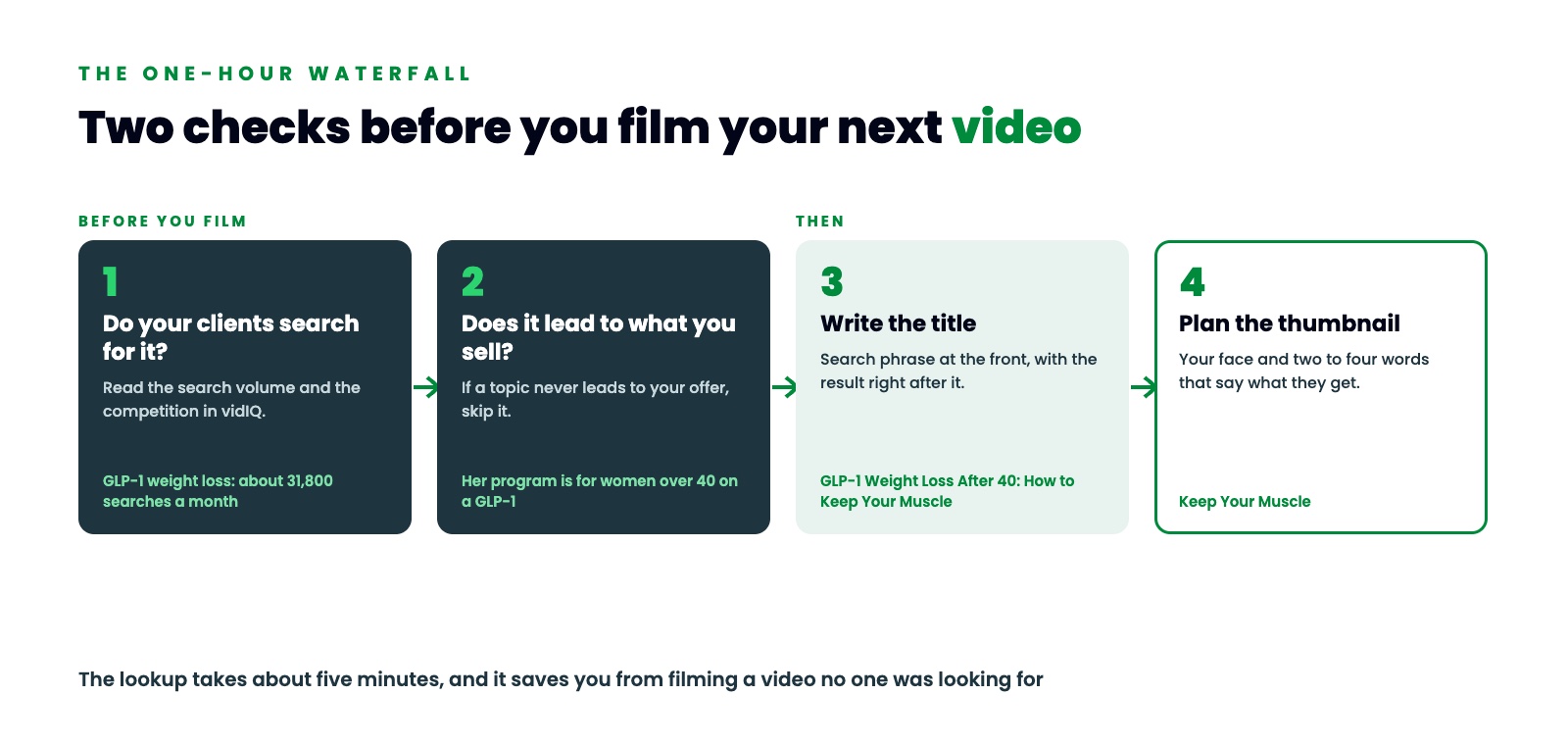
The first number is search volume. It's how many times people look that phrase up on YouTube every month. When I looked up GLP-1 weight loss for our example coach, it had about 31,800 searches a month on YouTube.
The second number is competition. It's how many other videos are fighting for those same people. For GLP-1 weight loss the competition was low enough that there was room for her.
Then I typed in the name of the drug. Ozempic had about 243,000 searches a month, and the competition jumped.
You wouldn't make a video called "Ozempic." But look how much demand is sitting in one niche once you find the right word. That's what I want you to go find in yours.
Those YouTube search volume numbers are from the day I looked. Read what your own screen shows when you check your topic.
What the search number tells you
About 31,800 times a month, somebody opens YouTube and searches GLP-1 weight loss. Each search is a person with a question.
A topic you guessed at has to win over a stranger who wasn't looking for it. A topic people search for already has their attention. They typed it in before they ever heard your name.
That's why the lookup comes first. The script, the clips and the giveaway all get planned after the topic. If the topic is one nobody was looking for, everything you build on it gets less attention.
It also gives you a simple way to choose between two YouTube content ideas. Look up both. Go with the one your clients search for more, as long as it passes the second check.
Check 2: Does the topic lead to what you sell?
Ask one more question before you pick a topic. Does this topic lead to what I sell?
Our coach runs a program for women over 40. GLP-1 weight loss walks people right up to her offer. The woman who types that phrase is the same woman her program is built for.
If a topic gets views but never leads to your offer, skip it. Views that never turn into calls are just a nice number on the screen.
Ozempic shows why you need both checks. It had about 243,000 searches a month, and that's more than seven times the searches for GLP-1 weight loss. But a video called "Ozempic" doesn't point at her program. "GLP-1 weight loss" has fewer searches and leads straight to what she sells, so it's the better pick.
Put the search phrase at the front of your title
Next up is the title. The search phrase goes right at the front, with the result right after it.
For our coach, that's "GLP-1 Weight Loss After 40: How to Keep Your Muscle."
Read it in two halves. "GLP-1 weight loss after 40" is what her client typed into YouTube. "How to keep your muscle" is the result she wants.
I paste the title into vidIQ's scorer and it gives me a score out of 100. I do this for every title before I use it. This week's video is called "How to Get Coaching Clients From YouTube With One Video a Week." That title scored 96.
Pick thumbnail words that add to the title
The thumbnail is her face and two to four words. For our coach, the words are "Keep Your Muscle."
The title and the thumbnail shouldn't say the same thing. The title tells people what the video is. The thumbnail tells them what they're going to get out of it.
So a woman scrolling YouTube sees the phrase she searched for in the title. Then she sees what she gets in the thumbnail.
Use the same search phrase after you film
The search phrase keeps working after the title is written.
Put it in the first sentence of your YouTube description. For our coach, that sentence says, "GLP-1 weight loss after 40, how to keep your muscle while the weight comes off."
It carries into your short videos too. I plan seven clip moments before I film, and one of our coach's clips is built on the search number itself.
It also carries into your blog. The blog is for Google, so somebody who searches your topic finds you before they've ever seen your video.
That's a lot riding on one topic. I film for about an hour a week. That one long video turns into a short video every day, plus carousels, posts and blog posts. Five minutes of looking decides what all of it is about.
Your five minute check before the next video
Do this before you write a script:
- Open vidIQ and type in what your client would say out loud.
- Read the search volume and the competition.
- Ask if the topic leads to what you sell. If it doesn't, skip it.
- Put the search phrase at the front of your title, with the result right after it.
- Score the title before you use it.
- Plan a thumbnail with your face and two to four words that say what they'll get.
I'm building this in public and I'm only two weeks in, so I'll keep telling you what's working and what I'm still figuring out.
Your clients are typing your next YouTube video ideas into the search bar right now. I look up both phrases on screen in the full video. Watch How to Get Coaching Clients From YouTube With One Video a Week.
FREE WATERFALL PLANNER
Get the free Waterfall Planner
The Waterfall Planner helps you plan a full week of content from one video, starting with the topic. It includes the AI prompt that writes your video scripts with you.
Comment WATERFALL on any of my posts, or DM the word WATERFALL to @mythriveengine on Instagram, and I will send it to you.
Want help building your own One-Hour Waterfall? Book a Thrive Engine demo.
